

Architecture Design: Cold-Start Cloud Hydration (Gap 3)
1. Executive Summary & Problem Definition
In modern cloud-native infrastructures (Kubernetes HPA, AWS ECS/Fargate, Google Cloud Run, Fly.io, and Knative), application containers are fundamentally stateless and ephemeral. When traffic spikes trigger horizontal autoscaling or rolling deployments replace running pods, new instances spin up with empty in-memory caches (L1 cold starts).
The Autoscaling Stampede Problem
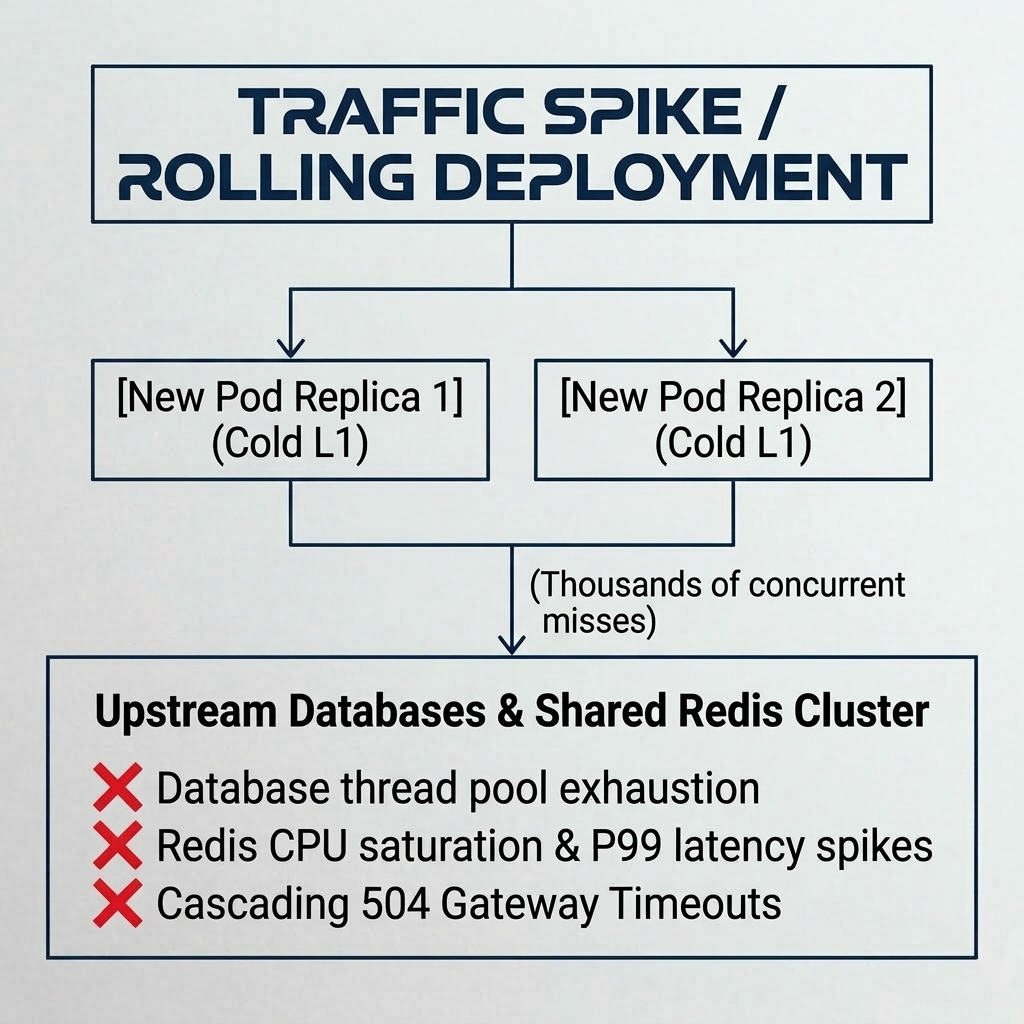
ASCII Stampede Flow
                          ┌─────────────────────────────────────────────────────────┐
                          │         Traffic Spike / Rolling Deployment              │
                          └────────────────────────────┬────────────────────────────┘
                                                       │
                           ┌───────────────────────────┴───────────────────────────┐
                           ▼                                                       ▼
                [New Pod Replica 1] (Cold L1)                           [New Pod Replica 2] (Cold L1)
                           │                                                       │
                           └───────────────────────────┬───────────────────────────┘
                                                       ▼ (Thousands of concurrent misses)
                          ┌─────────────────────────────────────────────────────────┐
                          │          Upstream Databases & Shared Redis Cluster      │
                          │   ❌ Database thread pool exhaustion                    │
                          │   ❌ Redis CPU saturation & P99 latency spikes          │
                          │   ❌ Cascading 504 Gateway Timeouts                     │
                          └─────────────────────────────────────────────────────────┘
Without cold-start hydration:
- Every newly scheduled container replica hammers upstream databases and shared Redis instances with duplicate queries for hot keys.
- Latency percentiles (P95/P99) spike dramatically during the first 1–5 minutes of deployment.
- Database connection pools frequently exhaust under sudden connection bursts.
2. Cold-Start Cloud Hydration Architecture
TriCache's Cold-Start Cloud Hydration enables stateless containers to serialize L1 memory into compact, encrypted binary snapshots and persist them to multi-cloud object storage (AWS S3, Cloudflare R2, Google Cloud Storage, Azure Blob Storage, MinIO, or internal HTTP blob gateways).
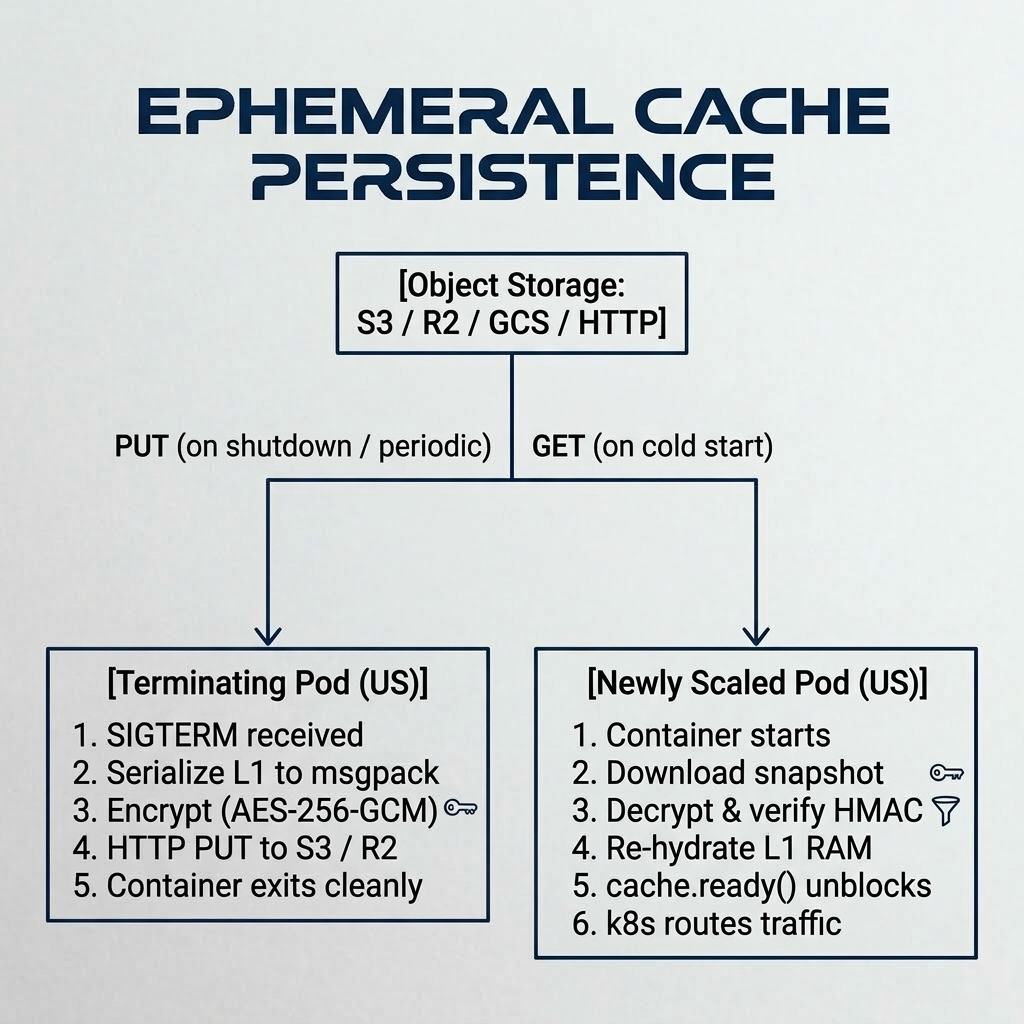
ASCII Hydration Lifecycle
                             [Object Storage: S3 / R2 / GCS / HTTP]
                                              ▲
                                     PUT (on shutdown / periodic)
                                     GET (on cold start)
                                              │
                   ┌──────────────────────────┴──────────────────────────┐
                   │                                                     │
                   ▼                                                     ▼
     ┌───────────────────────────┐                         ┌───────────────────────────┐
     │   Terminating Pod (US)    │                         │    Newly Scaled Pod (US)  │
     │                           │                         │                           │
     │ 1. SIGTERM received       │                         │ 1. Container starts       │
     │ 2. Serialize L1 to msgpack│                         │ 2. Download snapshot      │
     │ 3. Encrypt (AES-256-GCM)  │                         │ 3. Decrypt & verify HMAC  │
     │ 4. HTTP PUT to S3 / R2    │                         │ 4. Re-hydrate L1 RAM      │
     │ 5. Container exits cleanly│                         │ 5. cache.ready() unblocks │
     │ └─────────────────────────┘                         │ 6. k8s routes traffic     │
     │                                                     └───────────────────────────┘
     └───────────────────────────┘
3. The Six Reliability Pillars
Pillar 1: Kubernetes Readiness Probe Gating (cache.ready())
To prevent traffic from reaching an instance while it is hydrating, CacheService exposes await cache.ready(). When remoteSnapshot is configured, ready() returns a Promise that holds until the remote snapshot has been downloaded, decrypted, validated, and loaded into L1.
// server.ts
const cache = CacheService.create({
  remoteSnapshot: { adapter: mySnapshotAdapter },
});

// Gate Kubernetes readiness probe:
app.get('/health/ready', async (_req, res) => {
  await cache.ready();
  res.status(200).send({ status: 'ready', l1Keys: cache.stats().l1.keys });
});
Pillar 2: Staleness Fence (maxAgeMs)
A snapshot captured 6 hours ago during low traffic could contain outdated cache entries. TriCache embeds an exact UTC timestamp into the snapshot header and enforces maxAgeMs (default: 2 hours). If the snapshot age exceeds maxAgeMs:
- The snapshot is safely rejected.
- A warning is logged with the snapshot age in minutes.
- The cache falls back to starting cold without crashing.
Pillar 3: Graceful Shutdown Flush (saveOnShutdown: true)
When Kubernetes, ECS, or Cloud Run drains a pod, it sends SIGTERM. TriCache automatically intercepts SIGTERM and SIGINT, serializes live L1 entries, and pushes the snapshot to object storage before the process exits.
Pillar 4: Periodic Heartbeat Snapshotting (intervalMs)
Containers do not always shut down gracefully (e.g. AWS EC2 spot termination with 2-minute warning, Kubernetes OOM kills, unhandled hardware failure). By configuring intervalMs: 5 * 60 * 1000 (every 5 minutes), TriCache uploads a background snapshot on a timer, guaranteeing that a fresh snapshot is always available in object storage.
Pillar 5: Security & Compliance (At-Rest AEAD Encryption)
If encryptionKey is configured on CacheService, remote snapshots are encrypted using AES-256-GCM (or configured mode) with a cryptographically secure 12-byte IV and 16-byte authentication tag prior to transmission. Remote object storage never sees unencrypted application data, maintaining HIPAA/SOC2 compliance.
Pillar 6: Resilience & Fail-Safe Cold Fallback
If object storage returns HTTP 404 (first deployment), 500, or if data is truncated/corrupted:
- TriCache logs a descriptive warning.
- The startup sequence falls back to cold start immediately.
cache.ready()resolves successfully so the container passes health checks and serves traffic normally.
4. Snapshot Wire Specification
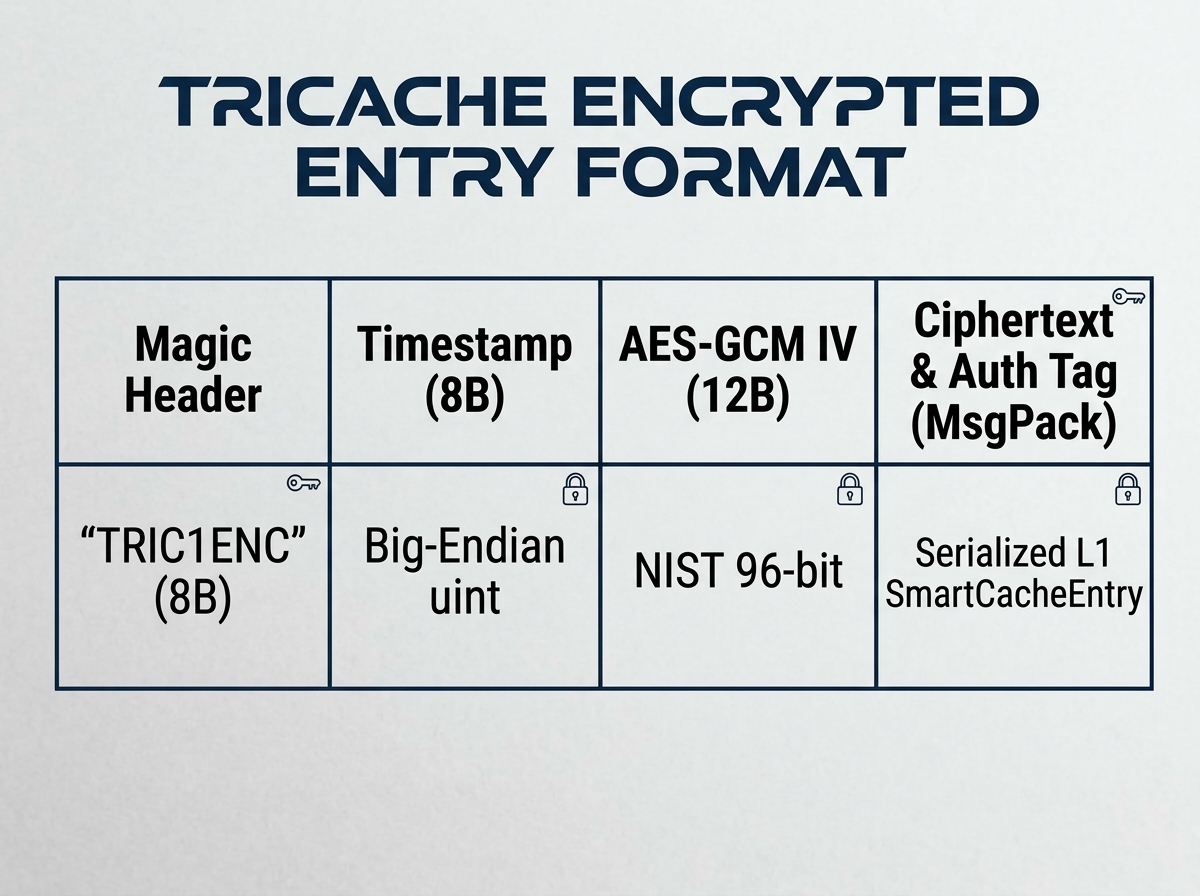
Binary Packet Layout
┌─────────────────┬─────────────────┬─────────────────┬───────────────────────────────┐
│ Magic Header    │ Timestamp (8B)  │ AES-GCM IV (12B)│ Ciphertext & Auth Tag (MsgPack)│
│ "TRIC1ENC" (8B) │ Big-Endian uint │ NIST 96-bit     │ Serialized L1 SmartCacheEntry │
└─────────────────┴─────────────────┴─────────────────┴───────────────────────────────┘- Magic Header: Identifies format (
TRIC1ENCfor AES-256-GCM,TRIC1128for AES-128-GCM, raw MsgPack when unencrypted). - Timestamp: Unix epoch timestamp in milliseconds for
maxAgeMsverification. - Payload:
msgpackr2.1.0 packed record entries preserving TTL, staleAt, category, and access count.
5. Implementation Recipes
Recipe A: Zero-Dependency S3 / Cloudflare R2 Presigned URLs
import { CacheService, createHttpSnapshotAdapter } from 'tricache';

const httpAdapter = createHttpSnapshotAdapter({
  getUrl: process.env.SNAPSHOT_GET_PRESIGNED_URL!,
  putUrl: process.env.SNAPSHOT_PUT_PRESIGNED_URL!,
});

export const cache = CacheService.create({
  disableDisk: true,
  encryptionKey: process.env.CACHE_ENCRYPTION_KEY,
  remoteSnapshot: {
    adapter: httpAdapter,
    maxAgeMs: 3600_000,          // 1 hour staleness ceiling
    intervalMs: 5 * 60 * 1000,   // upload fresh snapshot every 5 minutes
    saveOnShutdown: true,        // flush on SIGTERM
  },
});
Recipe B: Native AWS SDK v3 Adapter
import { CacheService, createCustomSnapshotAdapter } from 'tricache';
import { S3Client, GetObjectCommand, PutObjectCommand } from '@aws-sdk/client-s3';

const s3 = new S3Client({ region: 'us-east-1' });

const s3Adapter = createCustomSnapshotAdapter({
  async get() {
    try {
      const res = await s3.send(new GetObjectCommand({
        Bucket: 'app-cache-snapshots',
        Key: 'production-l1.snap',
      }));
      const ab = await res.Body?.transformToByteArray();
      return ab ? Buffer.from(ab) : null;
    } catch (e: any) {
      if (e.name === 'NoSuchKey' || e.$metadata?.httpStatusCode === 404) return null;
      throw e;
    }
  },
  async put(data: Buffer) {
    await s3.send(new PutObjectCommand({
      Bucket: 'app-cache-snapshots',
      Key: 'production-l1.snap',
      Body: data,
    }));
  },
});

export const cache = CacheService.create({
  remoteSnapshot: { adapter: s3Adapter },
});