

TriCache — Kubernetes Production & SRE Deployment Guide
Enterprise Hardening: Zero-IOPS Off-Heap Storage, CIS/SOC2
readOnlyRootFilesystem: true, and Cgroup Memory Budgeting.
1. The Container Storage Dilemma in Cloud Environments
In cloud Kubernetes clusters (AWS EKS, GCP GKE, Azure AKS), containers do not run on dedicated bare-metal NVMe drives by default. They are constrained by:
- Network-Attached Persistent Volumes (AWS EBS / GCP PD): Remote disk latency fluctuates between 1ms and 350ms during multi-tenant throttling, burning burst IOPS credits.
- Docker / Containerd Overlay Filesystem: Copy-on-write overlay filesystems trigger inode contention and high write amplification.
- Strict Ephemeral-Storage Quotas: If a container cache fills
/tmp, the Kuberneteskubeletterminates the pod immediately (The node was low on resource: ephemeral-storage. Pod was evicted). - Zero-Trust Security Policies: Hardened enterprise production clusters enforce
readOnlyRootFilesystem: true, which blocks writes to standard filesystem directories.
2. The Solution: /dev/shm (POSIX Shared Memory / tmpfs)
TriCache automatically detects Linux container runtimes and targets /dev/shm when writable and provided with adequate capacity (
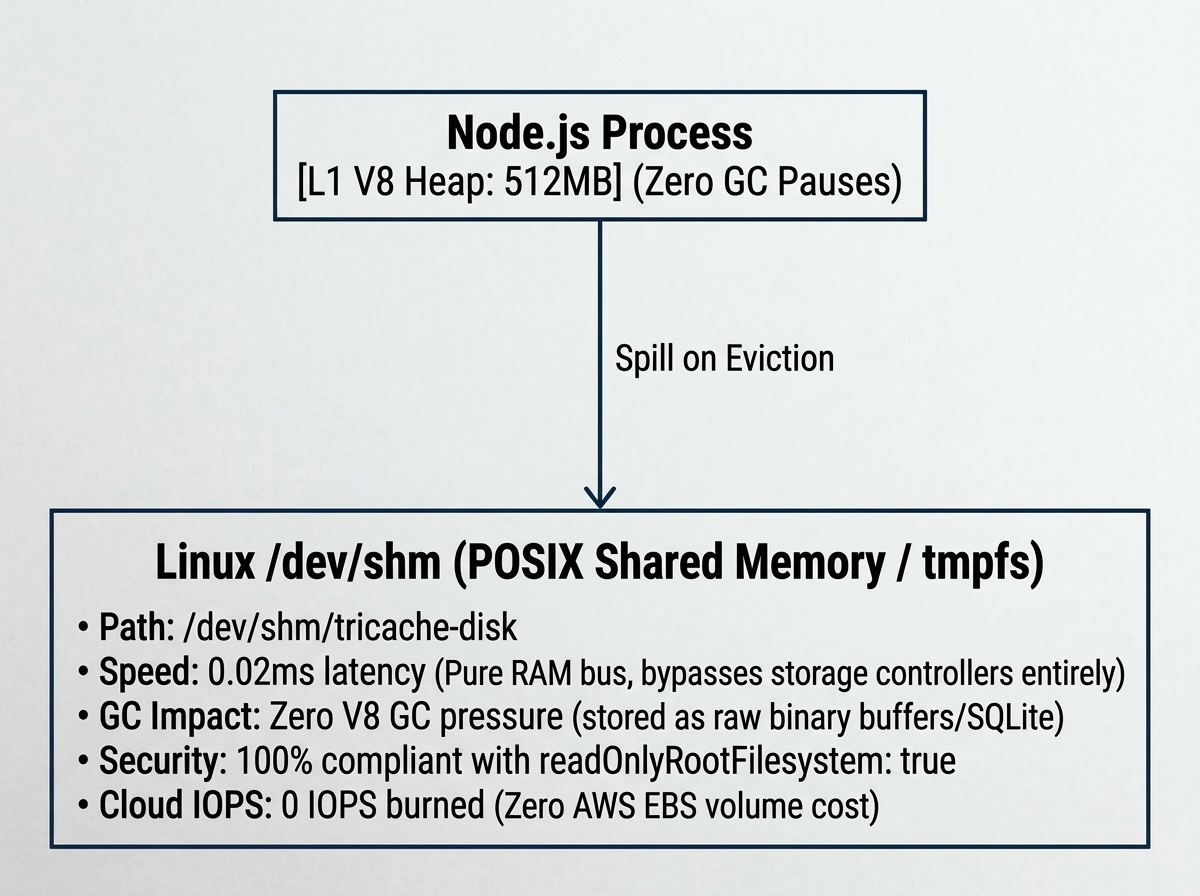
Memory Bus & Spill Topology
                      ┌─────────────────────────────────────────┐
                      │            Node.js Process              │
                      │  [L1 V8 Heap: 512MB] (Zero GC Pauses)   │
                      └────────────────────┬────────────────────┘
                                           │ Spill on Eviction
                                           ▼
┌────────────────────────────────────────────────────────────────────────────────────────┐
│   Linux /dev/shm (POSIX Shared Memory / tmpfs)                                         │
│   • Path: /dev/shm/tricache-disk                                                       │
│   • Speed: 0.02ms latency (Pure RAM bus, bypasses storage controllers entirely)        │
│   • GC Impact: Zero V8 GC pressure (stored as raw binary buffers/SQLite)               │
│   • Security: 100% compliant with readOnlyRootFilesystem: true                         │
│   • Cloud IOPS: 0 IOPS burned (Zero AWS EBS volume cost)                              │
└────────────────────────────────────────────────────────────────────────────────────────┘
Why SREs Approve This Pattern:
- Zero V8 GC Overhead: Large JavaScript objects are serialized into flat
msgpackrbinary buffers or SQLite WAL pages in off-heap memory. Even with 4 GB of cached data, Node.js event-loop GC pauses stay under 5ms. - Pure Memory Bus Speed: Reads and writes complete in ~20 microseconds (0.02ms), 100× faster than network Redis (1–2ms).
- Zero Cloud IOPS: Does not touch cloud storage volumes, eliminating EBS burst credit exhaustion.
- CIS / SOC2 Compliant: Functions cleanly within
readOnlyRootFilesystem: truecontainers when/dev/shmis mounted as anemptyDir.
3. The "Golden Path" Kubernetes Deployment Manifest
Here is the production-ready Kubernetes Deployment manifest passing enterprise security audits:
apiVersion: apps/v1
kind: Deployment
metadata:
  name: api-service
  namespace: production
  labels:
    app.kubernetes.io/name: api-service
spec:
  replicas: 3
  selector:
    matchLabels:
      app.kubernetes.io/name: api-service
  template:
    metadata:
      labels:
        app.kubernetes.io/name: api-service
    spec:
      containers:
        - name: web
          image: my-registry.example.com/api-service:v1.2.0
          imagePullPolicy: IfNotPresent

          # 🔒 Enterprise CIS Benchmark & SOC2 Security Context
          securityContext:
            readOnlyRootFilesystem: true
            runAsNonRoot: true
            runAsUser: 10001
            allowPrivilegeEscalation: false
            capabilities:
              drop:
                - ALL

          env:
            - name: NODE_ENV
              value: "production"
            # Node memory limit must be aligned with cgroup quota (see Section 4)
            - name: NODE_OPTIONS
              value: "--max-old-space-size=1536"
            - name: REDIS_HOST
              value: "redis-cluster.cache.internal"
            - name: CACHE_ENCRYPTION_KEY
              valueFrom:
                secretKeyRef:
                  name: cache-secrets
                  key: encryption-key

          resources:
            requests:
              cpu: "1000m"
              memory: "2560Mi" # 2.5 GiB
            limits:
              cpu: "2000m"
              memory: "3072Mi" # 3.0 GiB (Must accommodate V8 Heap + /dev/shm + OS overhead)

          # Volume mount for off-heap tmpfs RAM cache
          volumeMounts:
            - name: dshm
              mountPath: /dev/shm

          # Health & readiness checks
          readinessProbe:
            httpGet:
              path: /ready
              port: 3000
            initialDelaySeconds: 2
            periodSeconds: 5
          livenessProbe:
            httpGet:
              path: /healthz
              port: 3000
            initialDelaySeconds: 5
            periodSeconds: 10

          lifecycle:
            preStop:
              exec:
                command: ["/bin/sh", "-c", "sleep 5"]

      volumes:
        # Ultra-fast off-heap RAM disk (Zero EBS cost, Zero GC pauses)
        - name: dshm
          emptyDir:
            medium: Memory
            sizeLimit: 1Gi # Kubernetes kernel-enforced hard ceiling
4. Kubernetes Cgroup RAM Accounting & Memory Budgeting
CAUTION
Understanding Memory Cgroups: In Kubernetes, mounting an emptyDir with medium: Memory is backed by the host's Linux page cache. Files written to /dev/shm are charged against the pod's container memory limit (resources.limits.memory).
If you allocate a 2 GB memory limit to your pod and write 1 GB to /dev/shm while Node.js uses 1.5 GB of heap, the Linux Kernel OOM killer will terminate your pod (OOMKilled).
The Golden Memory Budgeting Formula
Calculate your pod memory request and limit using the following formula:
Concrete Example Configuration:
| Component | Setting | Size | Notes |
|---|---|---|---|
| Node.js V8 Heap | --max-old-space-size=1536 | 1,536 MB | V8 in-memory objects ( |
| TriCache | emptyDir.sizeLimit | 1,024 MB | Off-heap /dev/shm tmpfs allocation |
| OS / Native Buffers / Libuv | Buffer overhead | 512 MB | Node.js runtime, OpenSSL, worker threads |
| Total Container Limit | resources.limits.memory | 3,072 MiB (3.0 GiB) | Minimum safe container limit |
5. Kubernetes Probes: Hard Separation of Liveness vs. Readiness
CAUTION
CRITICAL SRE DIRECTIVE (Liveness vs. Readiness Probe Separation): In container runtimes, developers frequently conflate probe semantics. If an SRE mistakenly hooks cache.health() into the Kubernetes Liveness probe (/healthz or /livez), a storage-starved or EBS-throttled pod will be killed by the kubelet.
When dozens of pods in an availability zone experience simultaneous storage contention, this triggers a cluster-wide cascading restart shockwave, taking down the entire service.
- Liveness Probe (
/healthz): Must ONLY verify that the Node.js event loop and HTTP server are alive and responsive. It must NEVER fail on cache degradation, EBS stalls, or Redis circuit breakers. - Readiness Probe (
/ready): Evaluatescache.health(). When local storage stalls or enters watermark pruning, or when the Redis circuit breaker opens,cache.health()reportsdegraded: true. WhenfailReadinessOnDegraded: trueis configured, the Readiness probe fails, causing the Kubernetes Service / Ingress load balancer to shed traffic while the pod remains alive to drain in-flight promises and heal its local storage.
Production Probe Handler Implementation:
import { CacheService } from 'tricache';
import express from 'express';

const app = express();
const cache = CacheService.preset('enterprise-hardened', {
  redisHost: process.env.REDIS_HOST,
  warmKeys: 'catalog:*',
  // Optional: fail readiness probe when degraded to shed ingress traffic
  failReadinessOnDegraded: true,
});

// ✅ READINESS PROBE: Controls ingress traffic routing
app.get('/ready', async (_req, res) => {
  await cache.ready(); // Ensure initial warm-up is complete
  const health = cache.health();

  if (!health.healthy) {
    // 503 sheds ingress traffic without killing the container
    return res.status(503).json({
      status: 'degraded',
      reasons: health.reasons,
      details: health.details,
    });
  }

  res.status(200).json({ status: 'ready', degraded: health.degraded });
});

// 🔒 LIVENESS PROBE: Process survival check ONLY (never fail on storage contention)
app.get('/healthz', async (_req, res) => {
  // Simple ping confirms the Node.js event loop is alive
  res.status(200).send('OK');
});

await cache.ready();
app.listen(3000);
6. Dynamic Tier Latency Watchdog & Fleet Blast-Radius Shielding
Under cloud conditions (e.g. AWS EBS burst credit exhaustion or noisy neighbor contention on shared NVMe), disk read latencies can spike from 50µs to 150ms+.
A naive binary failover drops 100% of spilled traffic onto Redis simultaneously across the fleet, creating a catastrophic Redis cascade shockwave. TriCache replaces binary switches with a control-theory graduated dampening engine:
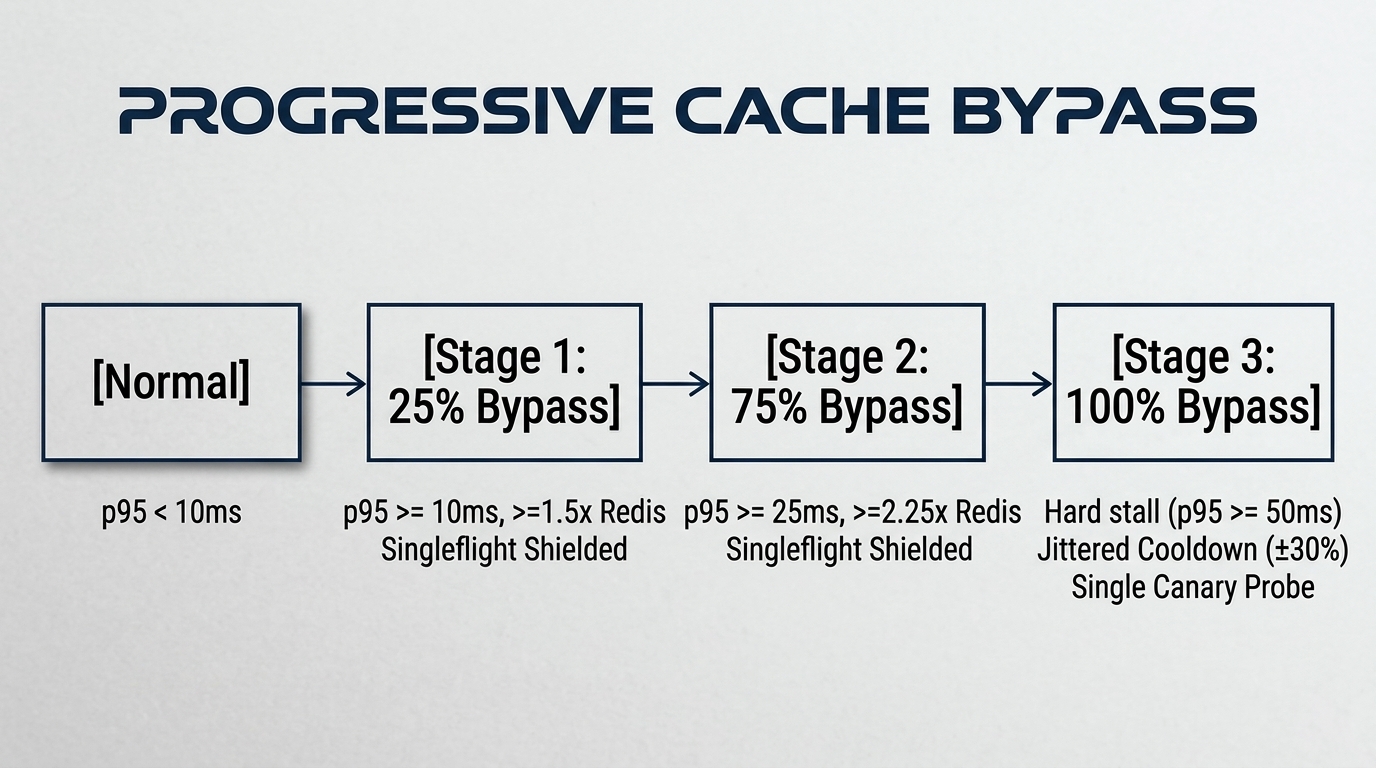
Graduated Bypass Stages Flow
[Normal] ────────> [Stage 1: 25% Bypass] ────────> [Stage 2: 75% Bypass] ────────> [Stage 3: 100% Bypass]
p95 < 10ms          p95 >= 10ms, >=1.5x Redis       p95 >= 25ms, >=2.25x Redis     Hard stall (p95 >= 50ms)
                    Singleflight Shielded           Singleflight Shielded          Jittered Cooldown (±30%)
                                                                                   Single Canary Probe
Control-Theory Safeguards:
- Amortized Zero-Allocation Ring Buffer: p95 latencies are computed on pre-allocated
Float32Array(32)rolling buffers every 32 samples—zero heap churn, zero garbage collection impact on the read path. - Singleflight Shielding on the Probabilistic Path: When Stage 1 coin-flips 25% of reads to Redis, identical concurrent keys coalesce onto the singleflight promise registry BEFORE the coin flip. 10 concurrent requests for the same cold key execute exactly once rather than splitting into 7 disk reads and 3 Redis reads.
- Asymmetric Hysteresis on the Redis Circuit: Diverting traffic to Redis increases Redis load. To prevent control-loop flapping, the watchdog cuts diversion when Redis reaches 15ms, and strictly refuses to re-engage diversion until Redis drops below 10ms across at least 16 consecutive samples.
- Anti-Synchronicity Jitter (
): Stage 3 cooldown incorporates randomized jitter between and duration, preventing fleet-wide lockstep recovery waves. - Single-Canary Half-Open Probing: When Stage 3 cooldown expires, exactly one canary probe is permitted to test local disk health. All concurrent requests remain diverted to Redis until the canary confirms recovery.
7. Strict Ephemeral Quotas & K8s Eviction Defense
Kubernetes pods are subject to eviction when local ephemeral storage limits are exceeded (ephemeral-storage: Pod was evicted). TriCache defends containers with a three-layer quota system:
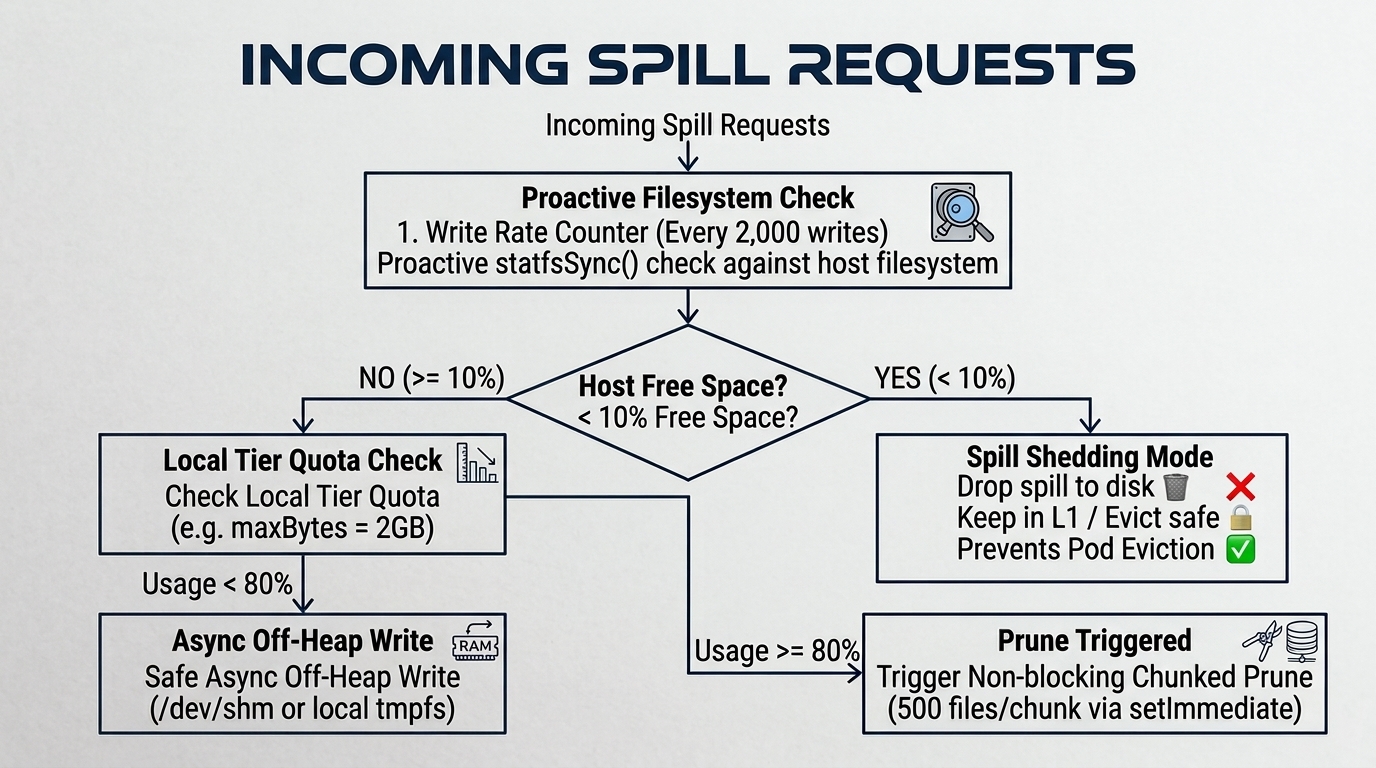
- Non-Blocking Chunked Watermark Pruning (80%
60%): When disk usage hits 80% of diskMaxBytes, TriCache triggers an asynchronous background prune down to 60%. Evictions occur in chunks of 500 entries, yielding to the event loop viasetImmediate()between chunks to guarantee zero HTTP request latency stalls. - Fast-Shedding Under Contention: While pruning is active or when storage quota is reached, incoming spills from L1 are immediately shed (
spillsShedTotal++), preserving memory safety without blocking the event loop. - Proactive
statfsHost Volume Health Check: Every 2,000 writes, TriCache checks volume capacity viafs.statfsSync. If host volume free space drops below 10%, spills are paused proactively to prevent Kubernetes DiskPressure eviction.
8. Graceful Shutdown & Kubernetes Pod Eviction
During pod rescheduling or rolling deployments, Kubernetes issues SIGTERM followed by SIGKILL after the terminationGracePeriodSeconds window (default 30s).
TriCache includes automated graceful snapshot flushers to ensure cache warming state is persisted before container termination:
// NestJS or Express graceful shutdown
process.on('SIGTERM', async () => {
  console.log('SIGTERM received: flushing TriCache snapshots...');
  // Flushes local disk snapshot and remote S3/R2 snapshot with a 5s timeout guard
  await cache.flushSnapshotOnShutdown(5000);
  process.exit(0);
});